| Review: Beginner's Final Cut Pro: Learn to Edit Digital Video |
July, 2002
Beginner's
Final Cut Pro: Learn to Edit Digital Video
Published by Peachpit Press
By Michael Rubin
ISBN: 0321118022
List price: $ 34.99 U.S.
257 pages
Review By Ken
Stone
Book excerpts follow review.
 I have read a dozen FCP beginner books
and I must tell you that 'Beginner's Final Cut Pro' by Michael
Rubin is truly unique. Rubin eschews the conventional approach
of teaching FCP that is used in beginner's books. The normal
approach is to start with information on the Mac, setting up
FCP and information on how FCP works. Then chapter after chapter
defining tools and procedures, techniques, menu items, keyboard
shortcuts and the myriad of different ways to work in FCP.
I have read a dozen FCP beginner books
and I must tell you that 'Beginner's Final Cut Pro' by Michael
Rubin is truly unique. Rubin eschews the conventional approach
of teaching FCP that is used in beginner's books. The normal
approach is to start with information on the Mac, setting up
FCP and information on how FCP works. Then chapter after chapter
defining tools and procedures, techniques, menu items, keyboard
shortcuts and the myriad of different ways to work in FCP.
This book is completely different.
Rubin teaches FCP by teaching Basic Editing, as we learn basic
editing principals we learn just those FCP tools needed to do
the job. This book could be called "Learning Basic Editing,
oh by the way we'll be using FCP".
To be sure there is introductory
material at the start of the book, what you need, how to hook
up your camera to FireWire. A quick tour through the interface,
importing video clips, work flow, FCP and your computer with
just the basic settings to get started. Each of these items is
covered briefly, normally in just a page or two. The book is
FCP generic, it does not matter what Mac you have, what OS you
are running or what version of FCP. It's about basic FCP and
basic editing.
The book ships with a DVD that
contains all the raw footage that you will need to put together
the mini movie that was shot just for this book. Also included
on the DVD are Projects, Sequences for the movie, music files,
insert shots and other material, even a shot list. There are
projects in versions: 1.25 - 2.0 - 3.0. Just drag the folders
to your HD and open the Project, you're ready to start cutting.
In the first section we are told
to load a clip into the Viewer. This section then deals with
the basic methods of navigating through the clip; TimeCode Duration,
Current TimeCode, Head and Tail, Mouse, Shuttle Knob, Scrubber
Bar, Jog wheel, Space Bar, JKL keys, Arrow keys, setting In and
Out points, etc. This is like 'Anatomy of A Clip 101'.
In the next chapter we are moved
into Basic Editing. The chapter starts of with editing language,
types of shots, Close Up, Medium, Wide shots, Establishing shots,
Inserts, point of view (POV) and a shot list of the little movie
that we are about to edit. We are then taught not only when to
use different types of shots but 'how' to edit the appropriate
shots into our FCP movie.
Each following chapter moves the
editing process further along. At each juncture and with each
new technique we are introduced to the FCP tools needed to perform
the task. Insert and Overwrite, working on the TimeLine, Trimming,
Moving shots around, Split Edits, working with Audio, Sound tracks.
As the book progresses we build
our little movie. Each lesson is orientated from the Editors
point of view. Need to improve the flow of a scene, to make the
edit less obvious? We are taught split edits. Need to imply the
passage of time between clips? We learn transitions. Bad audio
in an otherwise good shot? How to replace the audio. Need to
move a clip to improve the story? Swap edits. Want some drama
in the opening establishing shot? Fade up from black with the
video footage starting in Black and White and changing to full
color over time, Keyframing and FCP filters. In the end we add
Titles, Credits and background music.....fade to black.
Later in the book are some nuts
and bolts for FCP: Creating new Projects, Logging, Capturing
and organizing media, Technical issues, Output and Distribution.
These sections are very brief, really just an introduction.
'Beginner's Final Cut Pro' is a
book for anyone who is just starting off with FCP. It is short
at 257 pages. It's unique approach works well as the reader is
so involved with learning about editing and actually editing
a short movie that they are almost unaware of the fact that they
are learning FCP. This books orientation towards Editing and
FCP and the minimal amount of technical information that it contains,
provides a high comfort level for the beginner. Because of it's
brevity this book is only a starting point for learning FCP.
After finishing with this book you will probably need to purchase
a fully instructional FCP tutorial book, but this is a great
way to get started. Michael Rubin writes well. This book was
a pleasure to read.
Enjoy,
--ken
Book Excerpt
from Beginner's Final Cut Pro: Learn to Edit Digital Video
.
By Michael Rubin
PeachPit Press
Pages 112 trought 114
HTML re-creation
Adjusting Your One-Track
Shots
Slide
 Slide is an elegant and magical tool. Imagine that your insert shot is not glued into the Timeline, but floating above it, like this:
 The
Slide tool allows you to grab hold of the clip, and move it (slide
it) around in the Timeline to occur earlier or later in the sequence.
Here's how it works in FCP.
The
Slide tool allows you to grab hold of the clip, and move it (slide
it) around in the Timeline to occur earlier or later in the sequence.
Here's how it works in FCP.
1 In
the sequence, find our insert shot of the bag in Kirsten's hand
(1J) and select it with the Arrow tool.
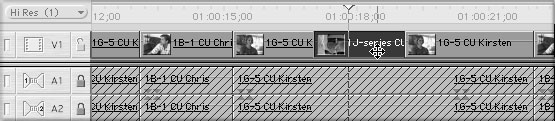
Actually, you didn't need to select the shot to do the slide, but I wanted you to see what it looks like when selected, as compared to when you're about to slide.
2 Go to the toolbox and get the Slide tool (if it's not immediately visible, it's under the Slip tool-click and hold to bring up other options for this toolbox position). Once you've selected the Slide tool, use it to click on this insert shot and select it.
3 Click and hold on the insert shot. You' ll see two now-familiar features pop up. First, the Canvas turns into the special two-up display. But rather than showing you the two frames at the edit point (as it does when you're trimming), it shows you the two frames of the tail and head around the insert shot. Since, presumably, you know what your insert looks like (it's a bag), and you're not changing it, there's no need to show it to you. On the other hand, as you slide the clip around, this dual dis-play will show you the frames to which the clip will now attach on either end.
The other familiar feature is the little tool tip window, where the num-ber of frames you've slid the shot are indicated (which I call the "shift-offset").
4 Slide the shot to the left a little bit. According to my tool tip window, I've moved -0:13; moving left is negative, so I just shifted the shot to the left 13 frames, or just under half a second.
5 Let go here and the Canvas will return to normal, and the insert shot will be moved to its new location.
Technically, Slide does not change the In or Out of the insert shot, but it does move the In (and Out) of where the shot goes in the sequence. Most beginners will find the Slide function intuitively obvious to use.
Excerpt from Beginner's Final Cut Pro:
Learn to Edit Digital Video, (pages 112-114), by Michael Rubin,
published by Peachpit Press. © 2002 Michael Rubin. Reproduced
by permission of Pearson Education, Inc. and Peachpit Press.
Review copyright © www.kenstone.net 2002
This
article first appeared on www.kenstone.net and is reprinted here
with permission.
All screen captures and
textual references are the property and trademark of their creators/owners/publishers.