| Review: Snowball Professional USB Microphone |
April, 2007
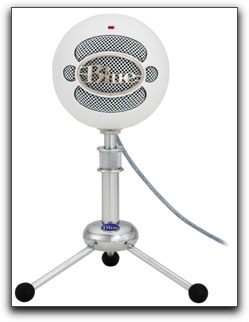
Snowball Professional USB Microphone
Blue Microphones $139.00 retail
System requirements for Macintosh: Mac OSX; USB 1.0 or 2.0; 64MB Ram
Review by Steve Douglas
There have been numerous USB microphones to hit the market and none that were much good in my opinion. Most were fairly cheap and you got what you paid for, not very much. They were tinny sounding, often had a pronounced reverb, and simply weren't much good for even the simplest of narrations or voiceovers, let alone using them for instrumentation.
I recently came across the Snowball USB microphone produced by Blue Microphones. Having some of the sharpest looking microphones around, the 40's retro look of the Snowball is certainly eye-catching.
Setup was a cinch, simply attach the USB cable from the back of the microphone into your USB port on the computer and you're ready to go. Whether you have been using an iSight cam/mic or not, make sure that you have gone to your system preferences to your sound input and highlight the Blue Snowball. Then just adjust input volume to fit your needs and you're set. The Blue Snowball is a fairly sensitive microphone and I found that setting it to about thirty-six percent for the input worked very well.
The Snowball utilizes two separate capsules for use depending upon the capture applications, be it for a variety of instruments, or for narration and voiceovers.
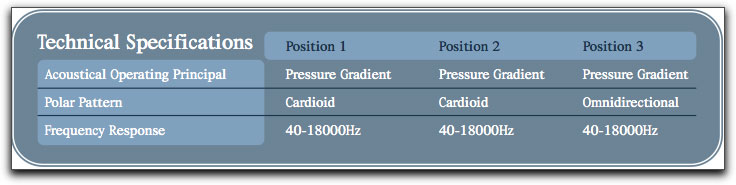
In the back of the Snowball there is a three-position switch, which determines which capsule is utilized and the sound that you will get. The first capsule has a fairly fixed cardioid pattern which allows the Snowball to pick up what is directly in front of it. In several tests, with the switch in the first position (the cardioid capsule in use) off axis audio was greatly dropped off as was to be expected. In the second position, the cardioid capsule is again activated but with a -10db PAD. This setting would be best used when recording loud noises where distortion of the signal could be a problem as the capsule has now reduced the output of the microphone.
The third position activates the omni directional capsule. A more transparent sound is apparent and while others may have different preferences, for narration, this was my favorite setting position.
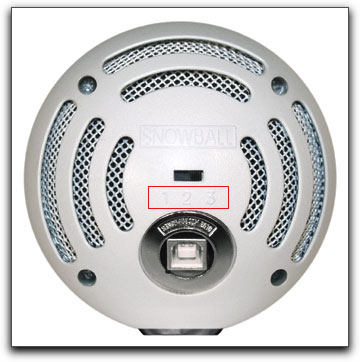
The 3 position switch
allows you to easily switch
between using the Snowball as a Cartioid or Omnidirectional microphone.
Using a pop filter with the Snowball Microphone is absolutely necessary for any voice work. Because it is wisely suggested by Blue Microphones that one eat the mic from about 2 inches away, (eating the mic is the act of keeping your mouth very close to the microphone itself. This practice is not necessary for all types of microphones but, for many it is, and the Snowball is one of them) not using a pop filter will be problematic. With the pop filter which will greatly eliminate the popping sound one hears when pronouncing words with the 'P' sound or words with an 'Sh' syllabication, the Snowball sounded clean and clear, able to reproduce the lows in one's voice effortlessly. There was none of that tinniness that is often associated with other USB mics. Looking at the frequency response chart supplied in the eight page manual it is easy to see why as the response is fairly flat from about 50 Hz to 8 KHz, especially so when using the omni capsule in setting 3.
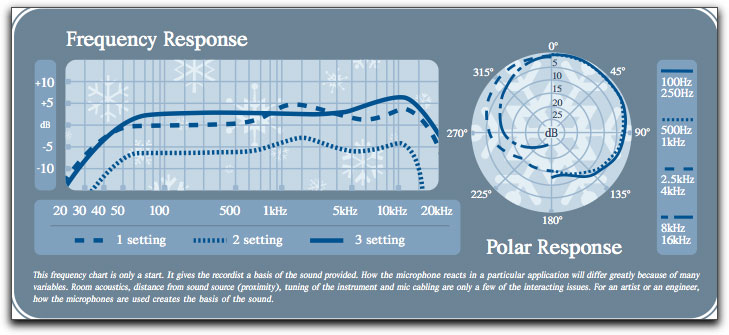
The frequency response
of the Snowball confirms the neutral sonics that your ears are
hearing.
The Snowball comes with a nifty little desktop tripod that will raise the microphone to about 8 inches at its center point. I found that unless one was a 'little person' or scrunched down real low, or could place the tripod on a higher elevation, perhaps the top of your NTSC monitor, that it was not very useful. From my sitting position at the computer, it would simply not raise itself high enough to reach my mouth. The Snowball was much easier for me to use by unscrewing the Snowball off the tripod and placing it on my boom stand. With the pop filter in place the Snowball worked like a charm providing good tone and clarity.
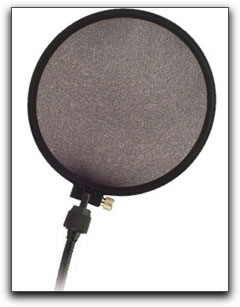
While it is relatively
easy to make a pop filter of your own,
usually they are inexpensive enough to just go to your nearest
guitar store and buy one.
Placing it in front of any microphone may prevent articulation
problems.
While I did most of my audio testing in QuickTime, I also experimented recording in both Soundtrack and Garage Band and all worked and sounded professional.
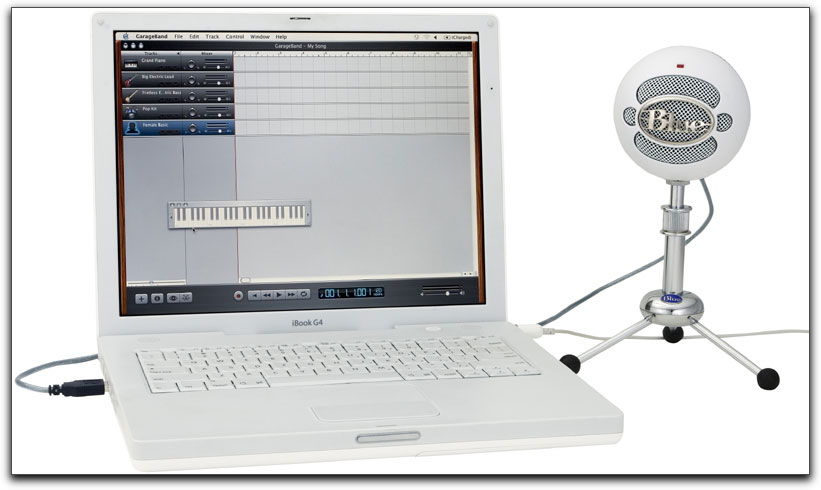
No matter what the
application used, Blue Microphone's Snowball performed flawlessly.
And this brings me to my bottom line. USB microphones have never really had much of a good reputation. The Snowball is not a cheap microphone by any sense of the word, and I'm not referring to price. It is not a toy mic with horrid colorations, no bottom end, and a sound that reminds one of someone stuck down a well somewhere in Kansas. However, the Snowball is fairly inexpensive, and well worth the small investment for such an easy to use and neutral sounding mic. Sure there are going to be many mics much more hi end than the Snowball, but isn't it about time that there was a USB mic that you could use, be happy with, and not have to apologize for? Blue Mic's USB Snowball is here.
 Steve Douglas is an underwater
videographer and contributor to numerous film festivals around
the world. A winner of the 1999 Pacific Coast Underwater Film
Competition, 2003 IVIE competition, 2004 Los Angeles Underwater
Photographic competition, and the prestigious 2005 International
Beneath the Sea Film Competition, where he also won the Stan
Waterman Award for Excellence in Underwater Videography and 'Diver
of the Year', Steve was a safety diver on the feature film "The
Deep Blue Sea", contributed footage to the Seaworld Park's
Atlantis production, and a recent History channel MegaDisaster
show. Steve is one of the founding organizers of the San Diego
UnderSea Film Exhibition and leads both underwater filming expeditions
and African safaris with upcoming excursions to Kenya, Bali &
Komodo in 2007, and Costa Rica and Palau in 2008. Feel free to
contact him if you are interested in joining Steve on any of
these exciting trips. www.worldfilmsandtravel.com
Steve Douglas is an underwater
videographer and contributor to numerous film festivals around
the world. A winner of the 1999 Pacific Coast Underwater Film
Competition, 2003 IVIE competition, 2004 Los Angeles Underwater
Photographic competition, and the prestigious 2005 International
Beneath the Sea Film Competition, where he also won the Stan
Waterman Award for Excellence in Underwater Videography and 'Diver
of the Year', Steve was a safety diver on the feature film "The
Deep Blue Sea", contributed footage to the Seaworld Park's
Atlantis production, and a recent History channel MegaDisaster
show. Steve is one of the founding organizers of the San Diego
UnderSea Film Exhibition and leads both underwater filming expeditions
and African safaris with upcoming excursions to Kenya, Bali &
Komodo in 2007, and Costa Rica and Palau in 2008. Feel free to
contact him if you are interested in joining Steve on any of
these exciting trips. www.worldfilmsandtravel.com
copyright © Steve
Douglas 2007
This article first appeared
on www.kenstone.net and
is reprinted here with permission.
All screen captures and textual references are the property and
trademark of their creators/owners/publishers.