| Review: ReelSmart
Twixtor 1.2 |
April,
2001
ReelSmart
Twixtor 1.2
Re:Vision Effects, Inc.
Requirements for
Macintosh Versions of ReelSmart Twixtor.
Hardware: Any PowerPC Machine. However, for performance's sake,
an iMac or G3 machine is highly recommended.
Macintosh System Software: System 7.5 or later.
$329.99
Review by Ned J. Soltz
Do you work in After Effects, Final Cut
Pro, Combustion, or Commotion? Do you need to change the speed
of clips, or even just stretch a clip? Do you ever have the kind
of day where you have 7 seconds of video but your edit list demands
8? How about the time you wanted to do a cool effect of variable
speed within a clip? What about converting between multiple formats
and frame rates (PAL, NTSC, film, interlaced video, progressive
frame video)? If any or all of these situations have cropped
up in your editing, then Re:Vision Effects has the plug-in for
you.
Twixtor changes speeds and frame
rates of clips by a process of interpolation and warping of frames
from the original sequence. Re:Vision Effects claims that their
technology enables calculation of motion down to the individual
pixel level. The results are a pleasure to behold; the learning
curve might be a little steep for those less familiar with the
intricacies of time-remapping.
Let me note at the outset that
Twixtor is an After Effects plug in and, even in Re:Vision's
own words, it loses some functionalities and requires some work-arounds
in other applications. Version 1.2 has just been released, which
fixes an incompatibility with Final Cut Pro so now with the appropriate
work-arounds, it integrates seemlessly with FCP. I was able to
run it without a crash or even so much as an error message.
The most significant feature which
works only in After Effects is that of changing frame input and
output rates. If you need to convert, for example, from 24 fps
to 29.97 fps, then you must work in After Effects. All other
functions are supported by Final Cut Pro and any other application
which accepts After Effects plug-ins.
In this brief overview of a small
but powerful plug-in, I will focus on Final Cut Pro but the principles
of its usage will apply equally to After Effects, Commotion and
Combustion.
Re:Vision Effects could have done
a little better job with their documentation. I am much more
a visual person and could have understood the metaphor behind
the program much better had I seen some screen shots or other
more graphic tutorials. And, as one whose computer background
is stronger than my motion graphics background, it took several
readings of the documentation and much trial and error with the
tutorial files before I found myself up and running. There do
remain several parameters which continue to be unclear to me,
but with experimentation with the plug-in I have begun to see
differing results. And, to be fair, I attribute this just as
much to the complexities of time warping clips as I do to sparce
documentation. A motion-graphics person will immediately grasp
the intricacies of Frame Interpolation and Motion Vectors.
Installing Twixtor is as easy as
launching the installer, entering personalization and serial
number and then dragging Twixtor from the Twixtor folder on your
hard drive to the plug-ins folder of your host application(s).
Then, apply it as you would apply any other filter.
Final Cut Pro requires several
work-arounds in order for Twixtor to do its work, and you need
to heed this carefully. First, in Sequence -> Settings ->
Video Processing tab, select "Always Render in RGB."
There are known issues with Final Cut Pro 1.2.5 and RGB versus
YUV rendering, and these issues extend to a number of third party
applications. Apple is aware. Next, under Sequence -> Render
Qualities ->Edit Render Qualities, you must Uncheck Field
Rendering, Draft Render and Frame Blending. Finally, if you are
processing footage with fields, the Viewer Window must be set
at 100% and Show As Square Pixels must be OFF.
 Now, here's the first concept in Twixtor that you
need to understand. You can't just apply Twixtor to a clip and
stretch its time. Since Twixtor is actually interpolating new
frames, it requires a "place to put" all those frames.
You thus need to create blank video which can draw the new frames
and place this in an intermediate sequence which then will be
dropped into another sequence.
Now, here's the first concept in Twixtor that you
need to understand. You can't just apply Twixtor to a clip and
stretch its time. Since Twixtor is actually interpolating new
frames, it requires a "place to put" all those frames.
You thus need to create blank video which can draw the new frames
and place this in an intermediate sequence which then will be
dropped into another sequence.
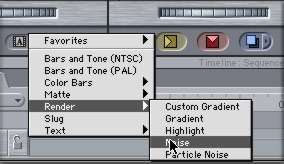
Re:Vision recommends using the
Noise generator to accomplish this. In our example, we wish to
stretch a 1 second clip to 3 seconds. I create a sequence (which
is simply titled Sequence 1) and generate a 3 second noise clip.
I then apply Twixtor to the clip.
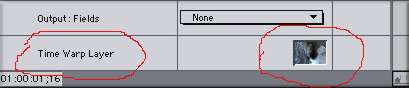 Double-click the clip to open it in the viewer window, click
the filters tab (as you would do to alter the parameters of any
filter applied in FCP) and notice the very bottom item contains
a "well" for the Time Warp Layer. I drag the cat clip
which I wish to stretch into this well and this becomes the layer
which Twixtor will remap to the duration of the blank video (in
After Effects, by the way, you would just create a new solid
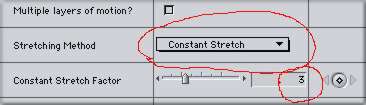
layer). Since this first example just involves stretching one
seconds to three seconds, in the Stretching Method pulldown I
merely set Constant Stretch and set the factor to 3.
Double-click the clip to open it in the viewer window, click
the filters tab (as you would do to alter the parameters of any
filter applied in FCP) and notice the very bottom item contains
a "well" for the Time Warp Layer. I drag the cat clip
which I wish to stretch into this well and this becomes the layer
which Twixtor will remap to the duration of the blank video (in
After Effects, by the way, you would just create a new solid
layer). Since this first example just involves stretching one
seconds to three seconds, in the Stretching Method pulldown I
merely set Constant Stretch and set the factor to 3.
 Some complexities may arise in determining the best
settings for the first two parameters, Frame Interpolation Method
and Motion Vector Quality. The documentation explains the differences
in the various settings, but for this example I chose to use
a Blend (what you would use when in doubt) and the Best Vector
quality just to test rendering times. Different video content
(lots of motion, patterned objects, items with lots of detail,
etc) might demand differing interpolation and vector qualities.
Careful reading of the documentation as well as trial and error
might be the only ways of determining which setting is best for
the specific clip.
Some complexities may arise in determining the best
settings for the first two parameters, Frame Interpolation Method
and Motion Vector Quality. The documentation explains the differences
in the various settings, but for this example I chose to use
a Blend (what you would use when in doubt) and the Best Vector
quality just to test rendering times. Different video content
(lots of motion, patterned objects, items with lots of detail,
etc) might demand differing interpolation and vector qualities.
Careful reading of the documentation as well as trial and error
might be the only ways of determining which setting is best for
the specific clip.
So, having set those parameters,
it is time to render. And here's the answer to the question on
all of your minds. On a Powerbook G4/400 mhz, stretching 1 seconds
to 3 (or, to put it in other terms, slowing down the action by
a third) at best quality required 7 minutes to render. The resulting
video was smooth and very natural in appearance.
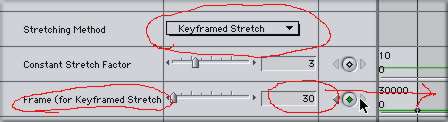 The next project I attempted was variable speed within
a clip. Here again, I chose to stretch the one second clip to
three seconds. But this time, I used the keyframe stretching
method. This requires some calculation since FCP does not set
the parameters automatically. Pull down Keyframe from the Stretching
Method parameter. Twixtor will then ignore any Constant Stretching
Factor which has been specified. Go to the beginning of the clip
and in the Frame parameter, set a keyframe of 0. Go to the last
frame of the original clip and set another keyframe, this time
30. This was an easy one to calculate since I have 1 second of
video and I am working at the assumption of almost 30 fps. Even
though we are "technically" at 29.97 fps, telling Twixtor
that the clip ends at keyframe 30 is close enough and effectively
does spell the end of the clip. Within that clip, I can set different
keyframes and that is where the speed can vary. Since I am stretching
1 second to 3, if my motion is constant, then I would expect
that at frame 30 of the "noise", my original clip should
be at frame 10. If I set a higher or lower value in the Frame
parameter, I can then alter the speed of the clip. Let's say
I want to hold a position for a few frames. Then at frame 30
I might set a keyframe of 10. At frame 60 I might set another
keyframe of 10. I have then held that action for 30 frames. If
I really want to accelerate the action, at frame 70 I might want
to set the final keyframe of 30. So, I have mapped 20 frames
of original footage to 10 frames of new footage. You do the math.
And the answer to the big question is it required 8 minutes to
render at Best quality.
The next project I attempted was variable speed within
a clip. Here again, I chose to stretch the one second clip to
three seconds. But this time, I used the keyframe stretching
method. This requires some calculation since FCP does not set
the parameters automatically. Pull down Keyframe from the Stretching
Method parameter. Twixtor will then ignore any Constant Stretching
Factor which has been specified. Go to the beginning of the clip
and in the Frame parameter, set a keyframe of 0. Go to the last
frame of the original clip and set another keyframe, this time
30. This was an easy one to calculate since I have 1 second of
video and I am working at the assumption of almost 30 fps. Even
though we are "technically" at 29.97 fps, telling Twixtor
that the clip ends at keyframe 30 is close enough and effectively
does spell the end of the clip. Within that clip, I can set different
keyframes and that is where the speed can vary. Since I am stretching
1 second to 3, if my motion is constant, then I would expect
that at frame 30 of the "noise", my original clip should
be at frame 10. If I set a higher or lower value in the Frame
parameter, I can then alter the speed of the clip. Let's say
I want to hold a position for a few frames. Then at frame 30
I might set a keyframe of 10. At frame 60 I might set another
keyframe of 10. I have then held that action for 30 frames. If
I really want to accelerate the action, at frame 70 I might want
to set the final keyframe of 30. So, I have mapped 20 frames
of original footage to 10 frames of new footage. You do the math.
And the answer to the big question is it required 8 minutes to
render at Best quality.
These are but two examples of what
you can do with Twixtor. It is a specialized plug-in that not
every editor will require. The limited market as well as no doubt
the extraordinary amount of programming required to create a
plug in of such intricacy translates into an expensive item.
But there is absolutely nothing else that will do with such precise
control what Twixtor does, not After Effect's time-remapping
function, not Boris Continuum and certainly not the very basic
"Change Clip Speed" in Final Cut Pro.
It suffers from what I would consider
weak documentation. And Final Cut Pro users will need to employ
a few work-arounds necessitated by the issues which FCP has with
many After Effects plug-ins. Still, Twixtor can be a valuable
tool for editors requiring smooth and accurate time warping of
clips. It's a real winner and it can make your videos real winners
as well.
Re:Vision
Effects, Inc.
Ned J. Soltz Ned Soltz is passionate about the
uses of technology to enhance the creative process. He only wishes
that he were more creative. Now that he has a mobile FCP studio
on his Powerbook G4, you can catch him on the road at nsoltz@aol.com.
copyright ©
Ned J. Soltz 2001
This article
first appeared on www.kenstone.net as is reprinted here
with permission
All screen captures and
textual references are the property and trademark of their creators/owners/publishers.